What is Grammarly?
Grammarly started as a grammar checker and has evolved into a comprehensive AI writing assistant. The core product — catching errors and suggesting improvements as you type — remains its strongest feature. But the Pro tier has added generative AI capabilities, tone analysis, plagiarism detection, and full-sentence rewrites that make it a meaningfully more powerful tool than it was three years ago.
It works everywhere: browser extension, desktop app, Word plugin, Google Docs integration, iOS and Android keyboard. That ubiquity is part of what makes it valuable. You get consistent writing assistance across every surface you write on.
Who is it for?
Grammarly is for anyone who writes professionally and wants a reliable safety net. Marketers, content creators, students, business writers, customer support teams — if you produce written communication regularly, Grammarly catches the errors you miss when you're moving fast. The Pro plan adds enough to justify the cost for daily writers. The free plan is legitimately useful for casual use.
Key features
Grammar and spelling
The foundation, and it's excellent. Grammarly catches not just obvious errors but contextual mistakes — the wrong form of "their/there/they're," missing commas, awkward sentence construction. After years of using it, it still catches things that slip through multiple re-reads.
Tone detection
One of the genuinely useful AI features. Grammarly analyzes the tone of what you've written — confident, direct, friendly, formal — and tells you how it will likely land with readers. For professional communication, this catches emails that sound more aggressive than intended before you hit send.
Full-sentence rewrites (Pro)
Highlight a sentence and Grammarly suggests alternative ways to phrase it — clearer, more concise, more formal, or more direct. It's not magic, but it's useful when you know something reads awkwardly and can't figure out why.
Plagiarism detection (Pro)
Compares your text against billions of web pages and academic sources. Essential for students and content creators who want to verify originality before publishing.
GrammarlyGO (generative AI)
The generative AI assistant lets you draft emails, summarize text, adjust tone, and generate content from prompts. It's competent but not best-in-class for generation — Jasper and ChatGPT produce better long-form output. Where GrammarlyGO shines is quick rewrites and tone adjustments within an existing document.
Integrations
Works in Chrome, Firefox, Safari, Microsoft Word, Google Docs, Outlook, Gmail, Slack, and most other writing surfaces. The breadth of integration is wider than any other writing tool in this category.
Pricing
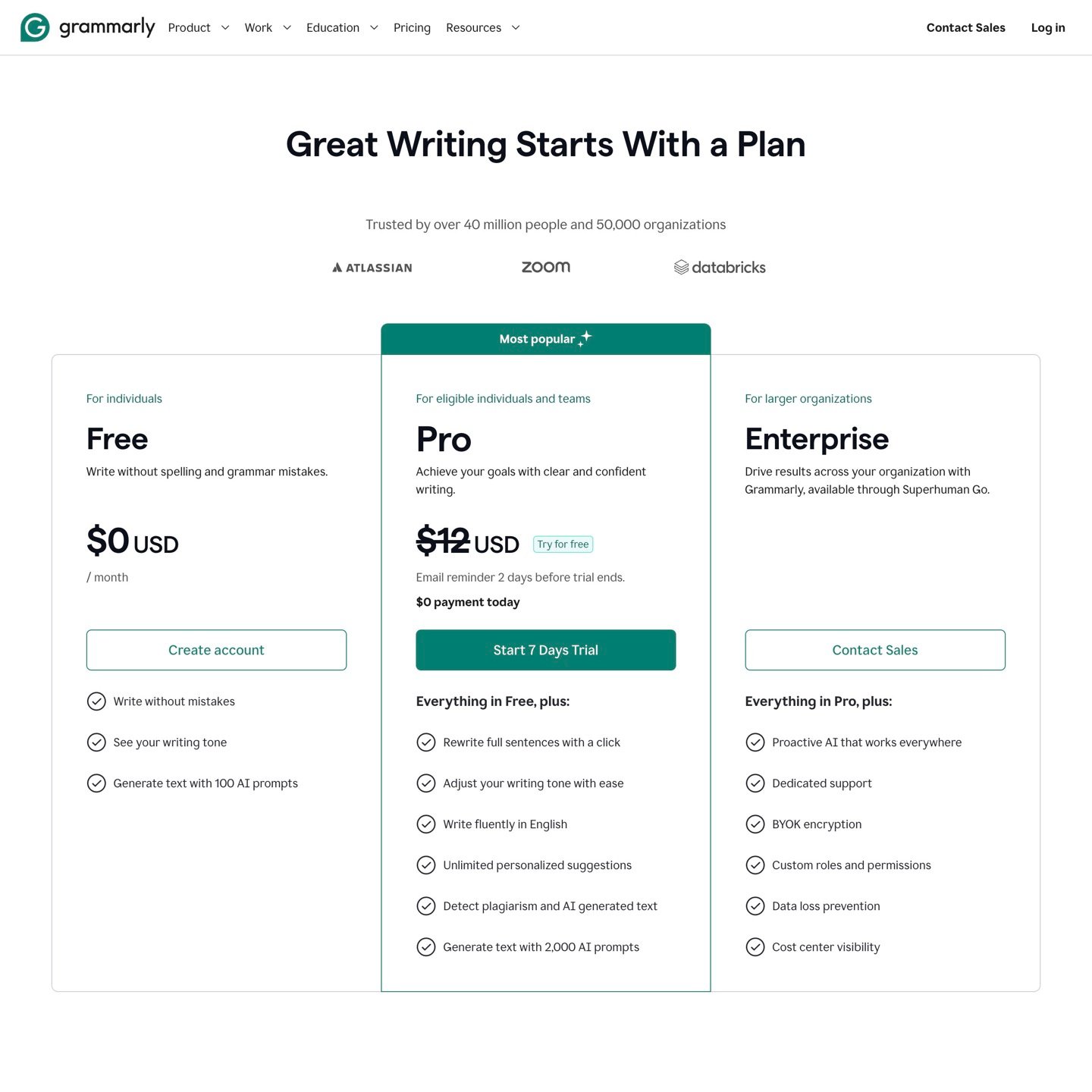
The "Premium" plan was renamed to "Pro." The Business plan was discontinued and replaced by Enterprise. Pro now includes features that were previously Business-only — style guides, brand tones, and usage analytics — alongside the existing 2,000 AI prompts/month.
The monthly plan at $30/month is overpriced relative to competitors. The annual plan at $12/month is a much more reasonable proposition — it's competitive with ProWritingAid and better integrated than anything else at that price. One important warning: Grammarly has documented complaints about promotional pricing that auto-renews at the standard rate. Set a calendar reminder before your annual renewal.
Performance in testing
Grammarly Pro's core grammar and clarity suggestions are consistently strong across key writing tasks — blog posts, emails, client reports, and social copy. The tone detection feature is particularly useful for professional communication, flagging messages that read more aggressively than intended.
The generative AI features are useful for quick tasks but don't replace dedicated writing tools. GrammarlyGO is good for adjusting tone and generating short responses. For anything longer than a few paragraphs, tools like Jasper or Copy.ai produce better output.
Desktop app performance is worth flagging. Some users report significant RAM consumption (17GB+) and occasional CPU spikes. We didn't experience this severely in testing, but it's a real complaint with enough documentation to mention. Test on your hardware before committing annually.
The browser extension is the best version of the product. It works smoothly across surfaces and the suggestions appear inline without interrupting your workflow.
Scores
Pros
- Best-in-class grammar and clarity suggestions
- Works everywhere you write
- Tone detection is genuinely useful
- Plagiarism checker included in Pro
- Free tier is legitimately useful
- Annual plan is competitively priced
Cons
- Monthly plan is overpriced
- Generative AI weaker than competitors
- Desktop app can be resource-heavy
- Auto-renewal billing complaints documented
- Email-only support, slow response times
Our verdict
Grammarly earns an 8.5 as the most reliable, most integrated writing assistant available. If you write professionally every day, the annual plan at $12/month is a straightforward yes. The free plan is worth installing regardless. The only caveat: use the browser extension rather than the desktop app if you're on an older machine, and set a reminder before your annual renewal so you're not surprised by the full-rate charge. For pure grammar and editing quality, nothing beats it.