This review is based on documented features, verified pricing, and community sentiment — not hands-on testing. See how we research →
Cursor Review 2026 — Inside the Agent-First AI Code Editor
RELATED
SpaceX's Cursor Acquisition: What It Actually Means for Developers → Cursor vs Windsurf vs GitHub Copilot — Full Comparison →What is Cursor?
Cursor started as an AI-first editor built on VS Code, but the Cursor 3 rebuild reframed the product around coding agents rather than autocomplete. The editor is still there and still familiar, but the centre of gravity has moved to agents that plan, edit, run, and test work across a codebase — with the developer reviewing and steering rather than typing every line.
At the core is Composer (Composer 2.5), Cursor's own coding model, tuned for fast agentic loops. Cursor reports it scores around 79.8% on SWE-Bench Multilingual — in the same range as Opus 4.7 and GPT-5.5 on that benchmark, by Cursor's own numbers — while running at roughly a tenth of the per-token cost ($0.50 per million input tokens, $2.50 per million output on the Standard rate). Its main limitation is a 200K-token context window, narrower than the frontier models it sits alongside. Those are vendor-reported figures rather than our own testing, but they explain the pricing structure below: the first-party model is cheap enough for Cursor to include a generous pool of it on paid plans. You can also point Cursor at frontier models from other labs — Claude Opus 4.8, GPT-5.5, and Gemini 3.1 Pro among them — and switch per task. This review covers Cursor's documented capabilities across common developer workflows, based on verified features, current pricing, and developer community feedback.
What changed in Cursor 3
The rebuild added the pieces agent-first development needs to hold up in day-to-day work:
- Composer 2.5 — Cursor's in-house coding model running the agentic loop, with multi-model access (Anthropic, OpenAI, Google, xAI) when you want it.
- Multi-repo workspaces — agents reason across more than one repository in a single workspace instead of one project at a time.
- Parallel agents, local and cloud — run several agents at once; cloud agents work on their own machines to build, test, and demo features end to end.
- Integrated browser — agents can open a browser to verify what they built and iterate on the result.
- Plugin marketplace — MCP servers, skills, and subagents installable from a marketplace, with team-shared rules and plugins on paid tiers.
- Commit-to-merged-PR flow — agents can carry work from a commit through to a reviewed, merged pull request.
- Launch from anywhere — kick off agents from desktop, web, mobile, Slack, GitHub, and Linear, then pick the work back up in the editor.
- JetBrains support and Bugbot — Cursor now runs in JetBrains IDEs as well as VS Code, and Bugbot provides agentic code review on pull requests.
- Native iOS app (public beta) — launch cloud agents or remote-control agents running on your computer from your phone, with lock-screen Live Activities and push notifications when an agent finishes or needs input.
Cursor for iOS (public beta)
On June 29, 2026 Cursor released a native iOS app, currently in public beta on all paid plans. It's one of the first native mobile apps from a major AI coding tool, and it does more than mirror the desktop. From your phone you can kick off always-on cloud agents, remote-control agents already running on your own machine, watch progress through lock-screen Live Activities, and get a push notification the moment an agent finishes or stops to ask a question. You can also review and merge pull requests without opening a laptop.
The practical use cases are the ones where being away from your desk is the whole problem: handling an on-call incident, reproducing a customer bug from a bug report, or turning a screenshot of mobile feedback into a task an agent picks up. It is worth being clear that this is a public beta rather than a finished release — expect rough edges — but few competing AI coding tools ship an equivalent native mobile app yet.
Pros and Cons
What stands out
Trade-offs to weigh
Performance Scores
Category breakdown
Pricing
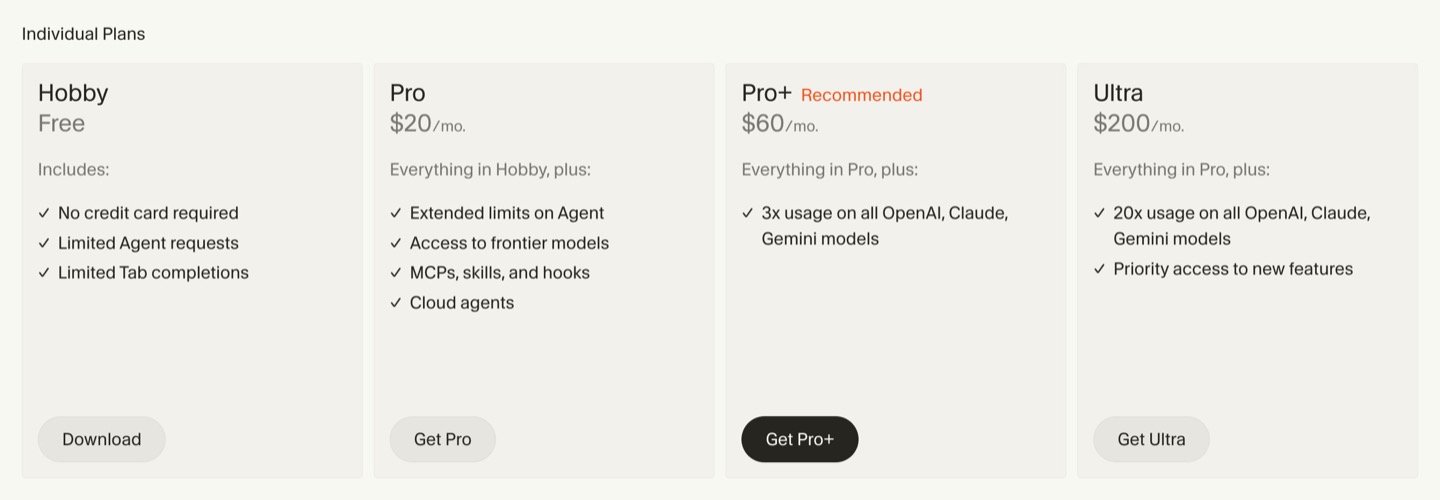
The credit mechanic is where most of the confusion lives — what draws the pool, what doesn't, and what happens when it runs out. We break it down in full in our Cursor pricing 2026 deep-dive →
Team pricing moved to a two-pool model — effective immediately for new customers and at July 1 renewal for existing ones. Every team seat now splits its included usage into a Composer & Auto pool (Cursor's own models, including Composer 2.5) and a separate Third-Party API pool (Claude, GPT, Gemini). The Standard seat stays at $40/user ($32 annual) but, according to Cursor, with significantly more total included usage than before, and a new Premium seat (~$120/user/month, ~$96 annual) that Cursor says offers roughly 5× that usage for heavy agent users. An admin dashboard breaks down usage per pool and can fire smart spend alerts.
In June 2025, Cursor shifted from a fixed 500-request model to a credit-based system — effectively cutting monthly requests from roughly 500 to ~225 at the $20 price point. The CEO issued a public apology. Auto mode is now unlimited; credits are only consumed when manually selecting frontier models like Claude Opus 4.8, GPT-5.5, or Gemini 3.1 Pro. Once the pool is spent, usage continues at API rates billed in arrears. Pro+ ($60/mo) and Ultra ($200/mo) tiers were added to serve heavier users, and team pricing was revised.
Who Should Use Cursor?
Cursor is worth evaluating for any developer spending more than a few hours per week writing code. Whether you're a solo indie developer or part of a larger team, many developers report real productivity gains from codebase-aware AI — though how much you see depends on your workload and how you use it.
If you're already using GitHub Copilot, Cursor is worth switching to — the multi-file context and natural language editing capabilities are a significant step forward.
Try Cursor Free — No Credit Card Needed
Start with the free Hobby plan and upgrade when you need more.
Download Cursor Free →Community Sentiment
What Users Are Saying
We track discussion across r/cursor_ai (180k+ members), r/programming, r/webdev, and G2 to surface real developer sentiment — not just feature lists.
"Switched from VS Code to Cursor and never looked back. The tab completions alone save me an hour a day."
"Composer built my entire React auth flow across 15 files in 20 minutes. Copilot just suggests lines — Cursor executes."
"The problem is they didn't give existing subscribers a migration period. You woke up one day and your 500 requests became 225. That's how you burn goodwill with developers."
"Inconsistent AI quality is the core issue — output can range from brilliant to completely off. Performance also lags on very large projects."
AIToolGrade Take
Community sentiment on Cursor is strongly positive for multi-file, complex workflows — that's the consensus across r/cursor_ai, r/webdev, and G2. The friction points are real but narrow: the June 2025 credit change stung existing users, and inconsistent output quality appears in heavier use cases. Neither issue undermines Cursor's core value proposition for professional developers. The community workaround — using Cursor for complex work and fallback tools for simple edits — is a pragmatic signal of where it earns its $20/month.
The Bottom Line
After the Cursor 3 rebuild, Cursor is one of the most capable agent-first coding tools available in 2026. Composer 2.5, parallel agents, multi-repo workspaces, the new iOS app for steering agents on the go, and the move from autocomplete to full agentic workflows put it at the front of the category on features. The open question is cost: the usage-based credit model rewards developers who understand it and frustrates those who get surprised by it. At $20/month for Pro — with Pro+ at $60 and Ultra at $200 for heavier use — it remains strong value if your workload fits the credit pool, which is why we recommend starting on the free Hobby tier and watching your usage before committing.